CYBERSECURITY MONTH 2026

In this article, we will discuss Chrome’s icons and warning messages related to connection security. These indicators evolve rapidly with new browser versions. Google’s goal is to raise awareness among an increasing number of visitors and webmasters about the security of data exchanges on the web.
Information
In the current version of Chrome, HTTP sites are displayed as follows:
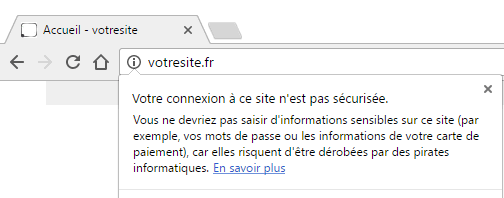
A grey icon with an “i” appears next to the address. Clicking on it displays the following message:
If the page contains a form or password field, the “Not secure” label is added next to the address.
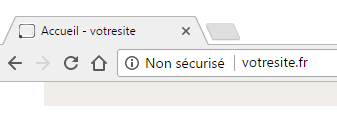
However, Chrome’s development team has already announced that this warning message will become increasingly explicit.
Not secure or dangerous
Announcement on Google’s blog (https://developers.google.com/web/updates/2016/10/avoid-not-secure-warn):
Chrome will show a Not Secure warning for all HTTP pages, whether or not the page contains sensitive input fields. You should consider migrating your site to use HTTPS for all pages.
In a few months, in new versions of Chrome, the “Information” notification will therefore be replaced by an icon that is far more noticeable and anxiety-inducing for visitors. It is a red triangle with an exclamation mark accompanied by the label “Not secure”. This notification can already be manually enabled from version 56; it will become the default option in upcoming versions.
To try it yourself, follow these steps:
- Make sure you have the latest version of Chrome installed. Go to Help > About Google Chrome.
- Enter the following command in the address bar: [dt_code]chrome://flags/#mark-non-secure-as[/dt_code]
- Select “Always mark HTTP pages as dangerous”
- Click “Relaunch Now” at the bottom left (do not worry, your open pages will be restored)
- Then visit an HTTP website
Here is the result. This is what visitors will soon see when visiting a page that does not have an SSL certificate to encrypt its exchanges:
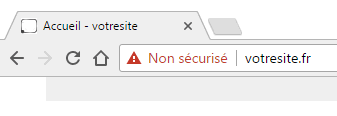
This move by the world’s leading browser makes Google’s intentions clear. It serves two purposes: warning visitors that anything they enter on this site is not encrypted, and encouraging webmasters to encrypt their sites using an SSL certificate.
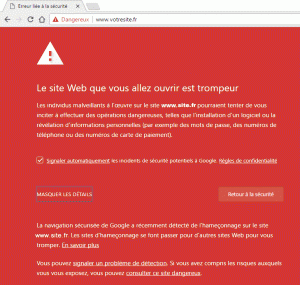
This red logo already appears systematically today when malware is detected or when a phishing attempt is underway. It also appears, for example, when a payment page does not use HTTPS or its certificate is invalid.
In these cases, the warning can become much more explicit and replace the web page with a warning message.
Guaranteed security
The well-known small green padlock, long present on payment pages, indicates that the certificate is valid and that your connection is secure.
This provides Internet users with 3 security benefits:
– Identity: using the certificate ensures visitors are exchanging data with an authentic site that matches the one displayed in the browser’s address bar.
– Confidentiality: all data transmitted between the site and the user’s device is encrypted and therefore unreadable to a malicious party.
– Integrity: the SSL protocol ensures that data cannot be intercepted and altered by a third party, for example to inject malware.
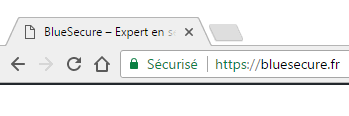
A site URL may include HTTPS, yet the browser notification may be red, crossed out or grey. In most cases, this is due to a certificate error or what is known as “mixed content”, which indicates to visitors that the site includes external modules or sources that are not secure.
To learn more about this subject, read our articles “How to fix the HTTPS Mixed Content error?” and “Common SSL certificate errors”.
Conclusion
The changes introduced in Chrome versions to warn users that content is not secure are in addition to the ranking boost granted by the search engine to HTTPS sites. It is now clear that Google has decided to wage war on HTTP sites in the name of a safer web. Migrating to HTTPS has become essential to maintain search rankings and reassure visitors.