 CYBERSECURITY MONTH 2026
Learning Studio: create your content, tailor ours
The editor built into the Learning Academy™ to create your internal modules and tailor BlueSecure modules. The Learning Academy™ covers universal topics: phishing, passwords, GDPR, artificial intelligence. Learning Studio lets you add your own content, and tailor existing modules to your context: your reporting process, your authentication method, your security tools.
- No-code editor
- Customizable BlueSecure modules
- Tracked in the same dashboards
Our reporting procedure
Phishing, with your tools
New joiner onboarding
Learning Academy™ or Learning Studio?
The two modules work together. The first brings the content, the second lets you create your own.
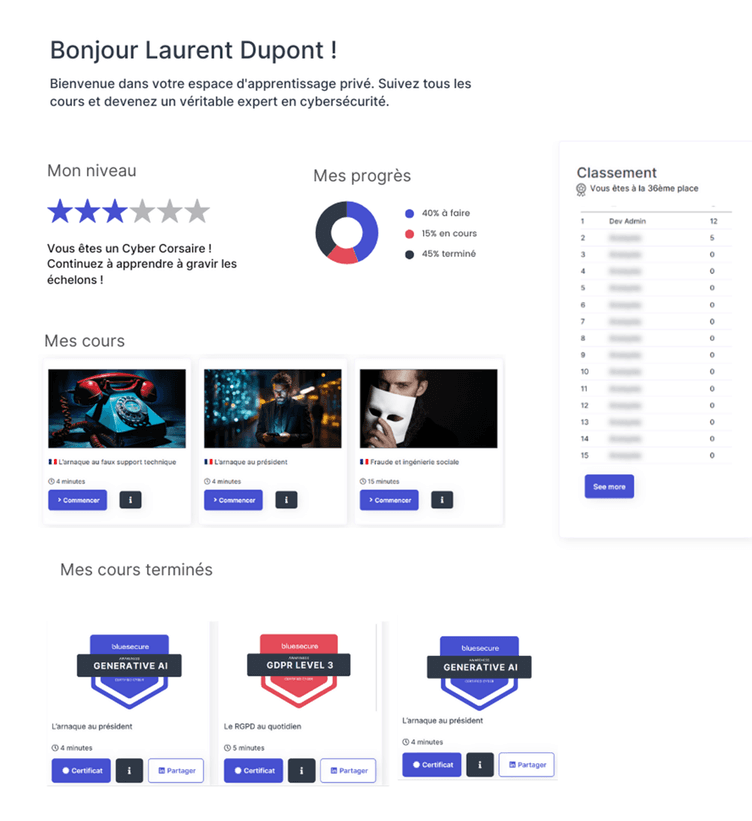
Learning Academy™, BlueSecure content
100+ modules, serious games and mini-games written and produced by our Game Studio. This content is ready to deploy and enriched every month.
Learning Studio, your content editor
The editor and creation assistant to produce your own modules, and tailor existing BlueSecure modules to your context, before deploying everything in one place.

Together, a single path
A learning path can combine BlueSecure modules and your internal modules, assigned to the same groups and tracked in one place.
Two ways to fit training to your context
Create your own modules
What to do in your organization when a suspicious email arrives, the name of your ticketing tool, your policy on generative AI: turn this information into modules your teams can access.
Tailor BlueSecure modules
Start from a Learning Academy™ catalog module and adapt it to your organization: add your reporting process, specify your two-factor authentication method, name the security tools you use. The universal topic becomes your training.
Create, deploy and track in one place
- Build a module without codeAn online editor that works by assembling blocks: text, image, video, quiz, starting from a blank page or an existing module.
- An assistant to structure your contentFrom an internal document, the creation assistant can suggest an outline, quiz questions and wording suited to the target audience. Every element remains subject to your approval.
- An experience in your brandLogo, colors, home page and notification emails in your organization's colors. Your internal modules and BlueSecure content share the same learner interface.
- Mixed learning pathsAssign paths by group and track completion, with reminders (including through the BlueSecure Assistant in Teams) and certificates depending on the configuration. Results reach the right teams through Smart Report™ reports.
Connected to your environment
- Directory and sign-in
- Microsoft 365 and Entra ID, Google Workspace, LDAP, Okta. Access by SSO or magic link, with directory sync depending on your configuration.
- With your existing LMS
- Learning Academy™ content can be delivered through SCORM API in your learning platform.
- Deployment options
- Cloud, dedicated server in a French datacenter or installation on your own servers. A SecNumCloud hosting option is available for stronger sovereignty requirements.
- Data that stays in France
- Platform data is hosted in France by French hosting providers certified ISO 27001, which are not subject to extraterritorial laws such as the US CLOUD Act.
Learning Studio for your role
HR & Training managers
Add cyber to the onboarding path, and attach your own internal topics.
CISO & CIO
Share your security policy, IT charter and procedures in a format designed to encourage participation.
DPO
Adapt your data protection policy to each role and document awareness actions.
Learning Studio in our plans
Learning Studio is available depending on the plan you choose. Up-to-date feature details are on the Pricing page.
Frequently asked questions
- What is the difference between the Learning Academy™ and Learning Studio?
- The Learning Academy™ gathers the content produced by BlueSecure. Learning Studio is the editor that lets you create your own and deploy it alongside that content, in the same environment and with the same tracking.
- Do I need technical skills to create a module?
- The editor works without code, by assembling blocks: text, image, video and quiz. You start from a blank page or adapt an existing module.
- How does the content creation assistant work?
- You submit an internal document and the creation assistant can suggest a module outline, quiz questions and wording suited to the target audience. Every element remains subject to your approval before publication.
- Can we tailor existing BlueSecure modules?
- Yes, it is one of the two uses of Learning Studio. You duplicate a module from the Learning Academy™ catalog and adapt it to your organization: reporting process, authentication method, security tools in use. The module keeps its learning structure, with your context.
- Can we mix our content with the catalog?
- Yes. A learning path can combine Learning Academy™ modules and your internal modules, assigned to the same groups and tracked in the same dashboards.
- Can we create internal content in several languages?
- Learning Academy™ content is available in up to twelve languages depending on the module. Multilingual versions of your internal content are also available.
- Is Learning Studio included in the plans?
- The availability of Learning Studio and the creation assistant by plan is shown on the Pricing page.
- How do we deploy internal training to several populations?
- You build your groups from the synchronized directory, assign the path, employees access it by SSO or magic link, and reminders can be scheduled depending on the configuration.
See Learning Studio in action
See how to create a module from one of your internal documents.